PRO VERSION - AVAILABLE ON GOOGLE PLAY

JTW Tree Rigging
Simulator Pro

Physics-based force calculation for tree rigging.
See the load on every pulley in real time,
and review the estimated loads before the work starts.

✓ Android | ✓ Japanese / English / Spanish | ✓ Works offline

SCROLL
Key Features

Field experience meets physics. Accurate force calculation makes the loads in a rigging setup visible,
so you can assess a plan before anyone leaves the ground.

2-, 3- and 4-Point Rigging Systems

From a single block to redirects with two or three pulleys. Loads are calculated in real time from the rigging geometry using F = 2T × cos(θ/2) and related formulas.

Three Languages, Two Unit Systems

Japanese, English and Spanish interface. Switch between metric (kg/N) and imperial (lbs/lbf) units at any time. Built for crews anywhere in the world.

Visual Feedback

Proportional load arrows (100 kg displayed load = 100 px), tree background images and color coding show at a glance where the load goes and help you assess the setup.

Tree Weight Calculator

Estimate the weight of a limb or log from its diameter, length and species. Eight species presets help you choose the right rigging point for the piece.

Custom Presets

Save the weight-calculation settings (species and dimensions) you use most, and get the numbers for your usual trees in seconds.

Works Offline

No internet connection is needed after installation. Reception on site does not matter: run your load calculations anytime, anywhere.

📸 Simulate on Your Own Site Photos

Import a photo of the actual site
and run the simulation on top of it

Plan the job in the office using a photo of the real tree.
"This site, this tree, this system - what happens?" becomes obvious at a glance.

What you get

  • ✓ Proportional load arrows (100 kg displayed load = 100 px) for an intuitive sense of the load
  • ✓ Color coding to help assess the setup at a glance
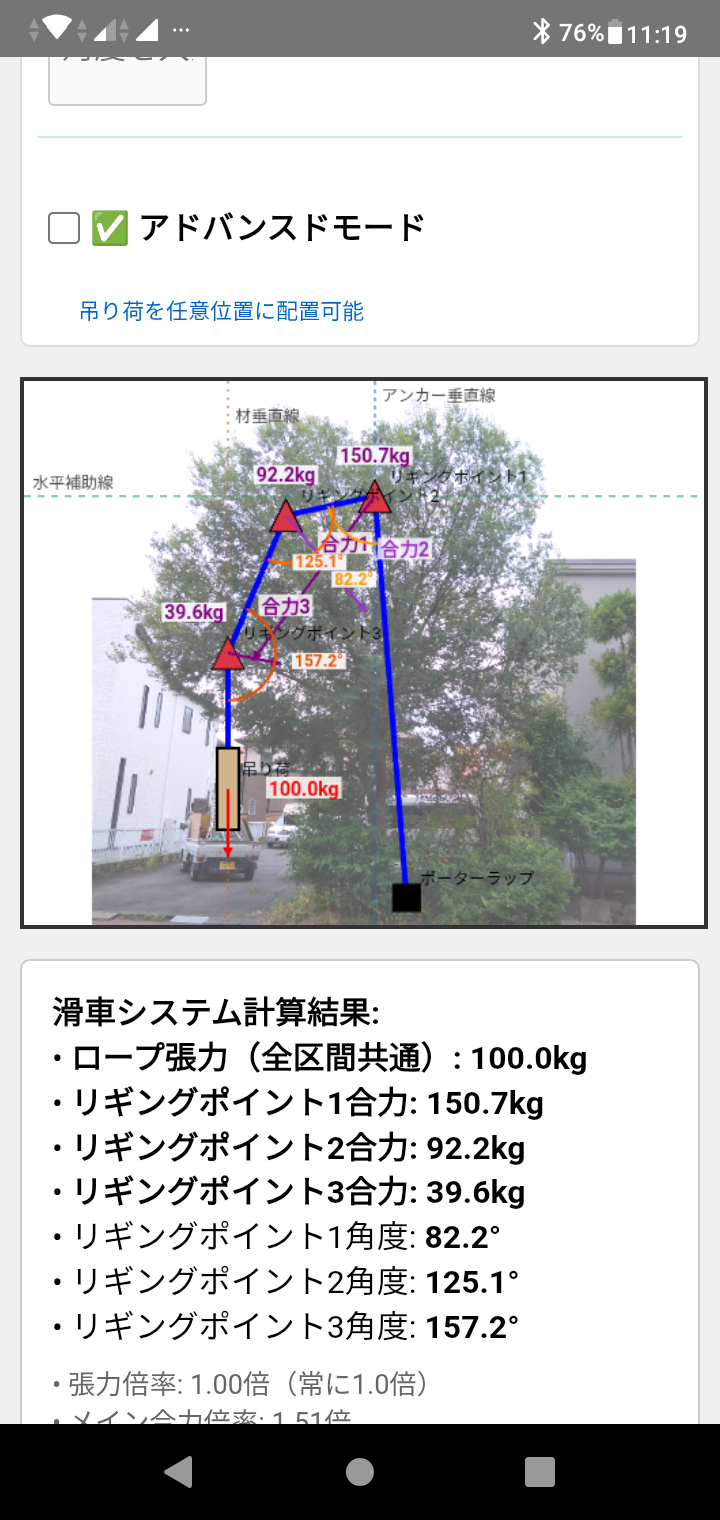
  • ✓ Calculation results overlaid on the site photo for pre-job review
Example: loads at three rigging points calculated and displayed on a photo of the actual site

▲ Real example
Loads at three rigging points calculated and visualized on a site photo

⚙️ Load Transfer Simulator

Included in the Pro app since V2.0.0. Watch the load move between two winch systems as you operate them.
This module is still being refined, and improvements continue.

Two winch systems,
and the load transfer made visible

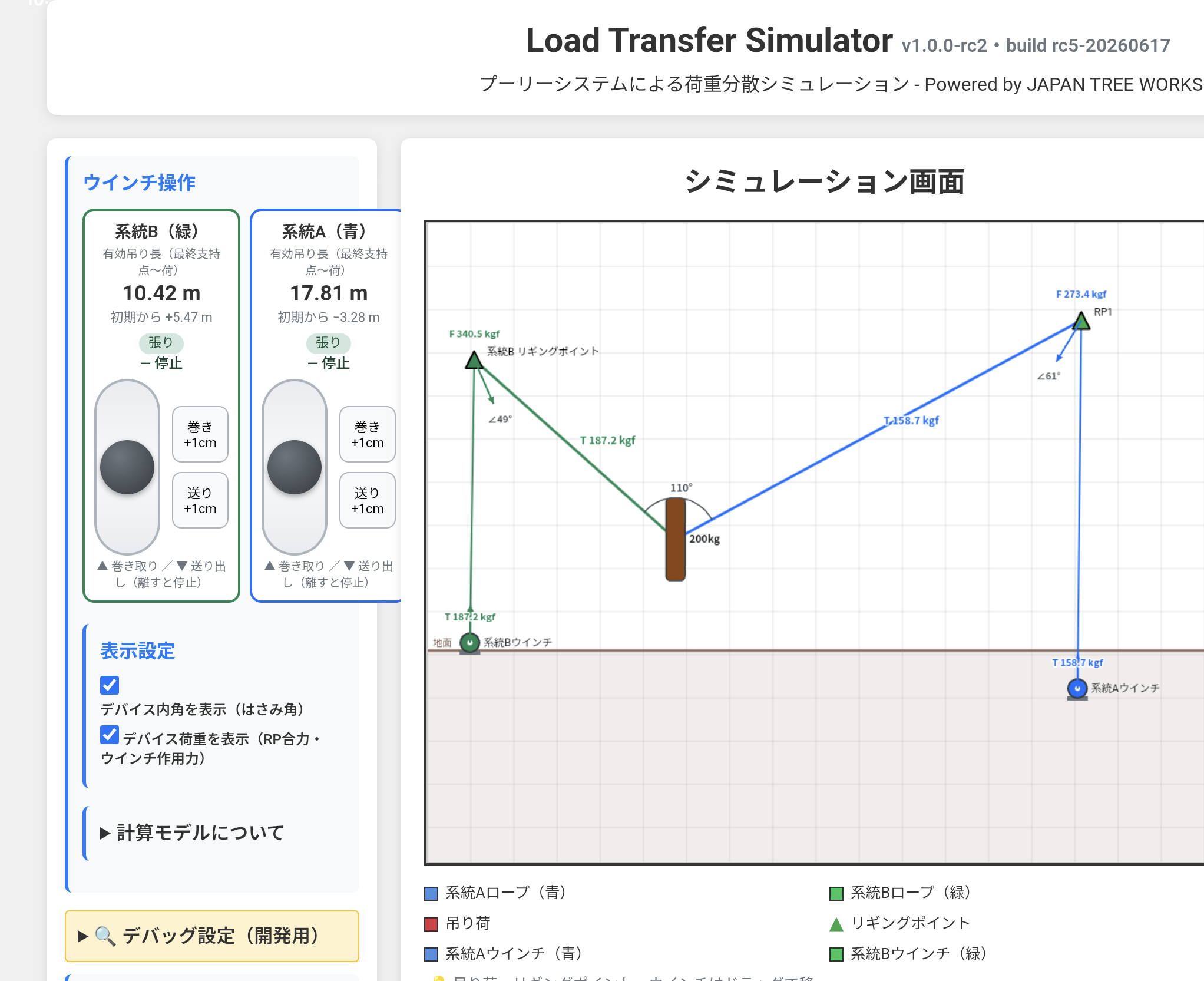
As the load is handed over from the existing system to the new one, the simulator shows in real time how the force on each system changes. "How far can I pay out, and how much load ends up on which system?" can be examined before the job.

What you get

  • ✓ Load-transfer simulation driven by two winch controls
  • ✓ Real-time load share and tension for each system
  • ✓ The whole transfer process, step by step, on screen

Note: this module includes features that are still in development. Improvements continue.

Load Transfer Simulator screen: load transfer between two winch systems with the load share of each system

▲ Actual screen
Load transfer between two winch systems, with the share carried by each

Specifications

Requirements

Version App 2.3.0 (Rigging Point Load Simulator V1.1.0 / Load Transfer Simulator v1.0.0-rc2)
OS Android 6.0 or later
Storage Approx. 5 MB (app itself)
Network Needed only for installation; works offline afterwards
License Google Play license (usable on the devices signed in to your Google account)

What's Included

  • ✓ 2-, 3- and 4-point rigging systems
  • ✓ Real-time physics (F = 2T × cos(θ/2) and related formulas)
  • ✓ Tree background images (two illustrations) and custom site photos
  • ✓ Load visualization (arrows show direction and magnitude)
  • ✓ Limb and log weight calculator (8 species presets)
  • ✓ Custom presets for weight-calculation settings
  • ✓ Load Transfer Simulator (two winch systems)
  • ✓ kg/N and lbs/lbf display
  • ✓ Japanese / English / Spanish, metric and imperial units

Get the App

The Android app is available on the Google Play Store.
Choose the Pro version or try the free version first.

JTW Tree Rigging Simulator Pro

The full version. Load values for every rigging point, detailed force analysis, the tree weight calculator, unlimited custom presets, and the Load Transfer Simulator.

Get it on Google Play (JTW Tree Rigging Simulator Pro)

JTW Tree Rigging Sim - Free

A separate free app for learning the basics. Place rigging points 1 to 3 and watch the load flow. Load values are shown for rigging point 1 only; the full numbers are in the Pro version.

Get it on Google Play (JTW Tree Rigging Sim - Free)

Closed testing has ended and the Pro app is released on Google Play. Former closed-test participants can keep using it; no additional steps are required.

FAQ

Q. Can I use the app on more than one device with a single account?

Yes. When you get the app from the Google Play Store, you can install it on the devices signed in to your own Google account.

Q. Does the app need an internet connection?

Only for downloading and installing the app. After installation it works completely offline, so poor reception on site is not a problem.

Q. Is there an iOS version?

Currently only the Android version is available. An iOS version is under consideration. The Android version can be downloaded directly from the Google Play Store.

Q. I took part in the closed test. Do I need to do anything now that the app is released?

No. Closed-test participants can keep using the released version. No additional steps are required.

Q. Is support available?

Yes, support is provided by email. Feel free to contact us with questions about how to use the app.

Contact

Japan Tree Works®

For questions about JTW Tree Rigging Simulator Pro, please contact us by email.

Location Yokohama, Japan